

8 PTA Meeting changes (you gave feedback, we listened)
You gave us honest feedback – the good, the bad and the ugly.
And we took action on it!
Here are some changes to PTA Meetings moving forward.
1. “Any time there were multiple people unmuted there was echo.” “The echos were frustrating” “Lots of echos. It would be nice if the host could mute everyone.”
Yeah, this was totally my bad.
Long story short, I figured out the issue ~10 minutes into the meeting and it shouldn’t have been an issue the last ~50 minutes.
And now that I got that figured out once, I should be able to avoid that entirely in future meetings.
2. “Lack of clarity between slides on what pertained to TPES and what pertained to PBES.”
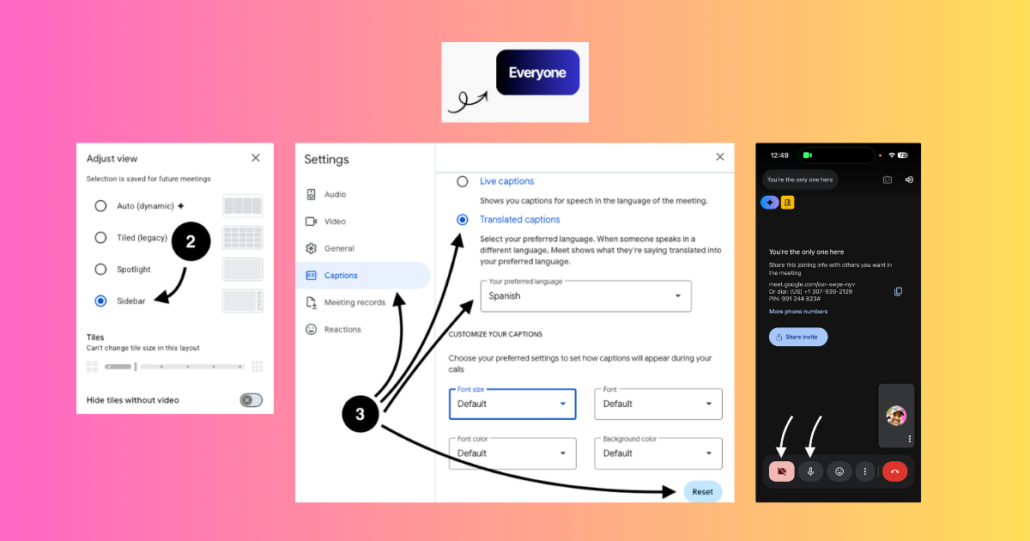
We’ve had some space in the bottom-left corner of slides so we added a little area so you know if a slide is for TPES, PBES or Everyone.

3. “The lack of PTA presence (from both schools) on screen: this should be a place where we are seeing and recognizing our PTA leadership, not looking at a sea of blank squares like every other impersonal meeting.”
Go off!
If the experience you want is to see more faces, that’s totally cool. We generally recommend the Sidebar view because it allows you to see the shared slides well as well as faces on the left side of the screen but there are other options.
One nice part about platforms like Google Meet is that you can select the view that works best for you.
- Go with Auto, Tiled or Spotlight views if they better fit your needs
- At the bottom of these settings, you can also click the toggle next to “Hide tiles without video” to only see those with their cameras on

And yes, everyone is welcome to join with their camera via video but that’s a personal choice we leave to each individual.
4. “Was there simultaneous translation in Spanish and Amharic? If so, I missed that.”
We had some initial slides going rolling through every ~15 seconds before the meeting got started, one of which gave clear instructions on how to turn on translated captions.

I was sorting out some audio issues before the call and wasn’t flipping to this slide as much as I should have.
I also didn’t highlight this slide at all once the meeting started, which I should have!
I’ve moved these slides to all be after the Welcome slide to make sure they’re reviewed explicitly but briefly for everyone.
5. “Harder to find camera and microphone controls on phone version”
They should be in the same place whether you’re joining from a computer, laptop, tablet, mobile browser or mobile app.
Both the camera and microphone controls are always at the bottom of the window!

6. “Doesn’t work with all browsers (Firefox)”
Often when Google Meet doesn’t work with Firefox, it’s because you have an active browser extension that’s causing a conflict.
Try disabling some of your old or unused extensions and/or opening the meet link in an Incognito Window and see if that helps!

And if all else fails, some good options for joining right on your phone are the Google Meet iOS app or Android app.
7. “Wouldn’t let me access with primary Gmail account, had to use another.”
This is often an account indexing issue. This sounds complicated but it’s usually a simple fix.
- Look at the top-right corner of the pre-meeting green room. Confirm the displayed profile photo and email address match your primary account.
- Click Switch account on that pre-join screen to explicitly select your primary email before clicking “Join.”
- Instead of multiple logins in one browser window, create separate Chrome Profiles (click your browser avatar at the top menu bar > Add Profile) for each Google account to isolate credentials and cookies completely.

And if all else fails, some good options for joining right on your phone are the Google Meet iOS app or Android app.
8. “I hate Google meet. Can’t do emojis for comments in the chat.”
Not sure if this was sent in jest or not but it gave me a good chuckle lol.
And you sure can! Just click inside the chat field and press Win + . (on PC) or Cmd + Ctrl + Space (on Mac).

Everyone is also welcome to spam emoji react in our next TPA Meeting.
But on a more serious note, I understand everyone has their preference of virtual meeting apps. PBES, TPES & both PTAs have come to a consensus that we’ll be trying out Google Meet this year. We’ll be sticking with that decision for the time being.
Thanks for reading this far. See you at the next PTA Meeting!
P.S. Psssst… if you’ve read this far, react in WhatsApp with the ‘Ear’ emoji 👂

